Best Free Quizlet Alternative in 2026
I started learning Spanish around 2020. My first serious tool was SuperMemo - the app that literally invented spaced repetition. The algorithm was excellent, but the interface felt like it was designed in the '90s (because it was), and it only ran on Windows. I wanted something I could use on my phone, on any device.
So I switched to Quizlet. It was clean, free, and I could study anywhere. Over the next couple of years I built up about 800 flashcards across different sets - verb conjugations, travel phrases, food vocabulary. Then one morning, the Learn mode just... disappeared behind a paywall.
No warning. No grandfather clause. Just a popup asking for $35.99/year to keep using a feature I'd relied on for months.
I'd already left one app because of its limitations. Now the replacement was locking me out too. Eventually I built Words on Repeat to solve my own problem - combining the algorithmic rigor of SuperMemo with a modern interface that actually works on every device. In this article, I'll cover what changed with Quizlet's free tier, what actually matters in a flashcard app (the algorithm, not the interface), how Words on Repeat compares as a free alternative, and how to migrate your existing cards.
Quizlet paywalled Learn mode, Test mode, and offline access. Words on Repeat offers FSRS spaced repetition, 7 quiz modes, and 200+ curated language decks - all free, no paywall. Try it here.
The Quizlet Paywall Problem (What Changed)
Quizlet wasn't always this way. For over a decade, it was genuinely free for students. Here's the timeline:
- 2022: Quizlet removes the free Learn mode - the adaptive study feature that actually helped with memorization
- 2023: Custom images, offline access, and ad-free studying all move behind Quizlet Plus ($35.99/year)
- 2024: AI-generated explanations launch... as a paid feature. Free users now see full-screen video ads between study sessions
- 2025-2026: The free tier is essentially a flashcard viewer. You can flip cards. That's about it
Here's what free Quizlet users have lost:
What Quizlet Free Still Has
- Basic flashcard flipping
- Community-made sets
- Simple card creation
What's Now Paywalled ($36/yr)
- Learn mode (adaptive study)
- Test mode (practice exams)
- Custom images on cards
- Offline studying
- Ad-free experience
- Expert textbook solutions
The frustration isn't just about money - it's about trust. Students built years of study material on Quizlet's platform, and now basic functionality requires a subscription.
Quizlet's free tier in 2026 is a card flipper with ads. Every feature that actually helps you learn is behind the $36/year paywall.
What Actually Matters in a Flashcard App
After trying every major flashcard app (and building one), here's what I've learned about what actually helps you memorize vocabulary.
The algorithm matters more than the interface
A pretty app means nothing if it shows you cards at random intervals. The science is clear: spaced repetition - reviewing cards at precisely calculated increasing intervals - results in 2-3x better long-term retention than simple repetition or random review.
Not all spaced repetition is equal though:
- Leitner system (boxes 1-5) - Simple but crude. Used by many apps. Better than random, but not personalized.
- SM-2 (SuperMemo's 1987 algorithm) - The original. Used by Anki for years. Works but doesn't adapt well to individual patterns.
- FSRS (Free Spaced Repetition Scheduler) - The current state of the art. Published in 2022, adopted by Anki in 2023. Uses machine learning on your personal review history to predict exactly when you'll forget each card.
Most "spaced repetition" apps actually use simple Leitner boxes or even just random intervals with fancy marketing. Ask what algorithm they use - if they can't tell you, it's probably not real spaced repetition. (For a deeper dive, see our guide to spaced repetition and FSRS.)
Active recall beats passive review
Flipping a card and thinking "yeah, I knew that" doesn't create strong memories. You need to produce the answer - type it, say it, choose it under pressure. This is called active recall, and it's why multiple study modes matter.
A flashcard app that only lets you flip cards is leaving learning gains on the table. You need modes that force you to produce answers, not just recognize them.
Context creates sticky memories
A word in isolation is hard to remember. A word inside a sentence, connected to a situation, is much easier. That's why example sentences, grammar notes, and thematic organization (food vocabulary, travel phrases, academic terms) are so important for language learning.
Words on Repeat: What We Built (and Why)
We built Words on Repeat because we wanted three things:
- Real FSRS spaced repetition - not a simplified version
- Multiple quiz modes on a free tier - not locked behind a paywall
- Pre-made decks organized by CEFR level - so learners don't have to create 2,000 flashcards manually
The FSRS algorithm in plain English
When you review a card, you rate it: Again (forgot), Hard (struggled), Good (remembered with effort), or Easy (instant recall). FSRS uses your response to update three things:
- Stability - how long until you'd forget this card (increases with successful reviews)
- Difficulty - how inherently hard this card is for you personally
- Retrievability - the probability that you can recall this card right now
The algorithm then schedules the next review at the point where your retrievability drops to about 90% - right before you'd forget.
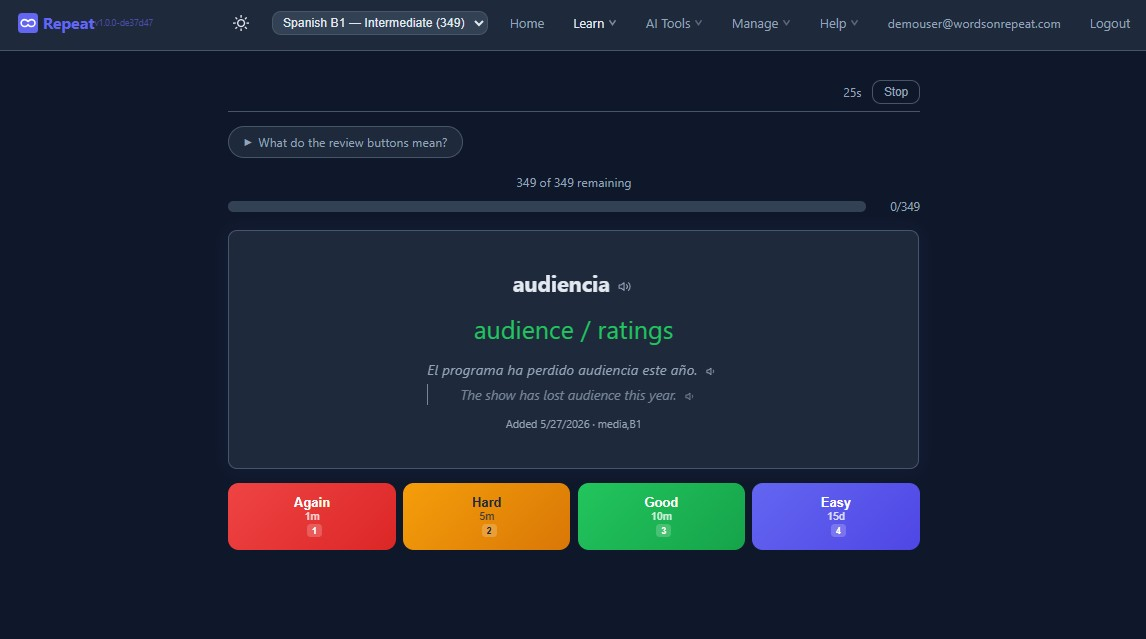
This means easy cards get pushed far into the future (weeks, months), hard cards come back quickly (hours, days), and your daily review load stays manageable instead of snowballing. Compare this to Quizlet, which essentially just shows you cards you got wrong "more often" with no mathematical model behind it.
7 quiz modes (all free)
Variety isn't just about preventing boredom - different modes train different aspects of memory:
| Mode | What it trains | Best for |
|---|---|---|
| Flashcards | Recognition + recall timing | Daily FSRS reviews |
| Multiple Choice | Fast recognition | Warming up, building confidence |
| Typing | Production + spelling | Languages with tricky orthography |
| Listening | Aural recognition | Pronunciation, comprehension |
| Matching | Speed + associations | Reviewing large batches quickly |
| True/False | Discrimination | Catching common confusions (ser/estar) |
| Speed Review | Retrieval under pressure | Testing what's truly automatic |
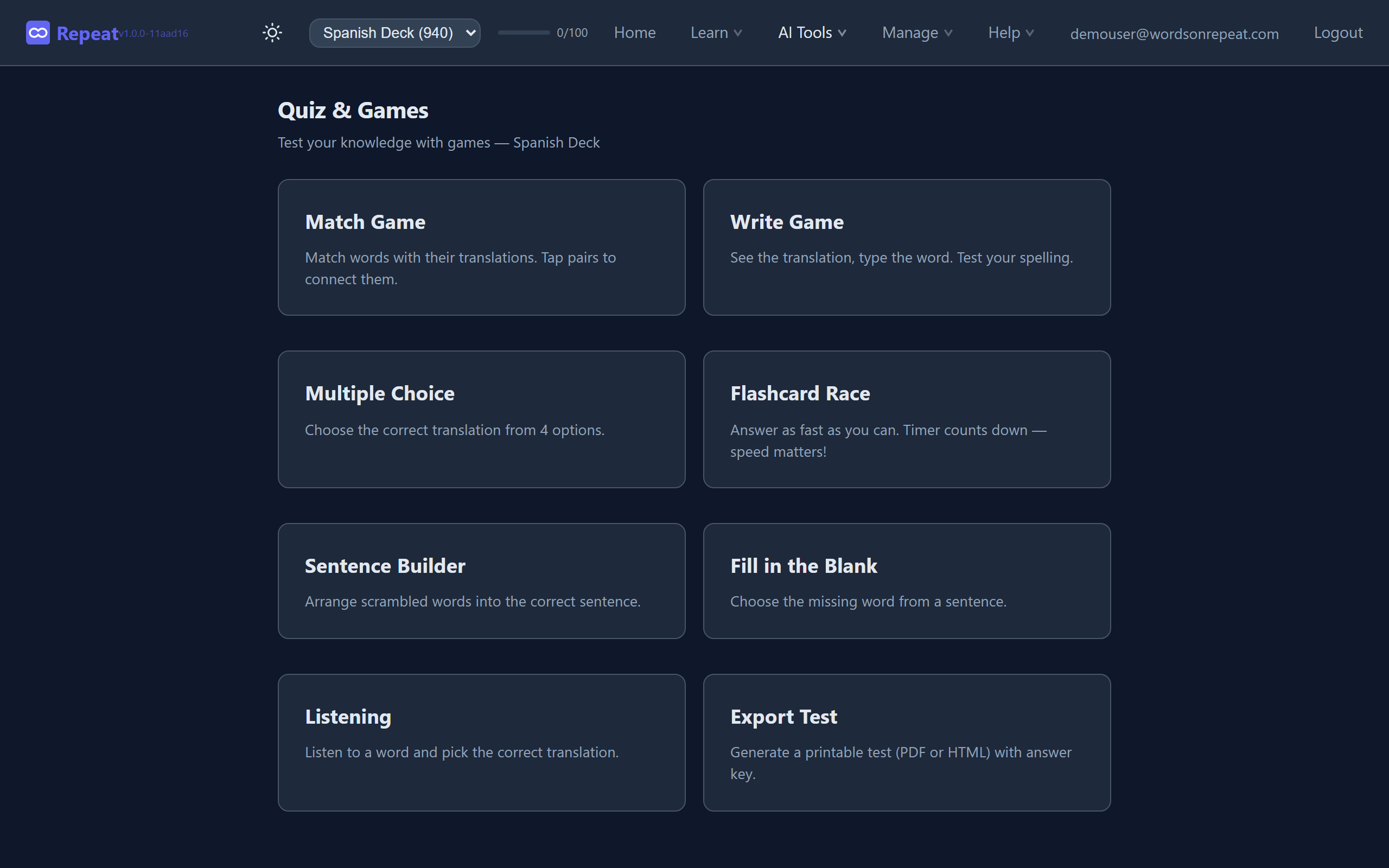
Use flashcards for your daily FSRS reviews, then switch to typing mode for words you keep getting wrong. Forcing yourself to produce the spelling cements it much faster than just recognizing it.
200+ curated decks by CEFR level
Instead of manually creating flashcard sets (or finding disorganized community sets with errors), Words on Repeat has official curated decks:
- 10 languages: Spanish, French, German, Italian, Polish, Portuguese, Dutch, Japanese, Korean, Chinese
- 6 CEFR levels per language: A1 (beginner) through C2 (mastery)
- Thematic sub-decks: Travel, Business, Food & Cooking, Academic, and more
- Every card includes: Translation, example sentence with translation, and grammar notes - contextual tips like verb conjugation patterns, gender rules, irregular forms, or usage nuances that you won't find on community-made cards
For Japanese, Korean, and Chinese, every card also includes romanization (romaji, romanized Korean, pinyin) so you can learn pronunciation alongside characters.
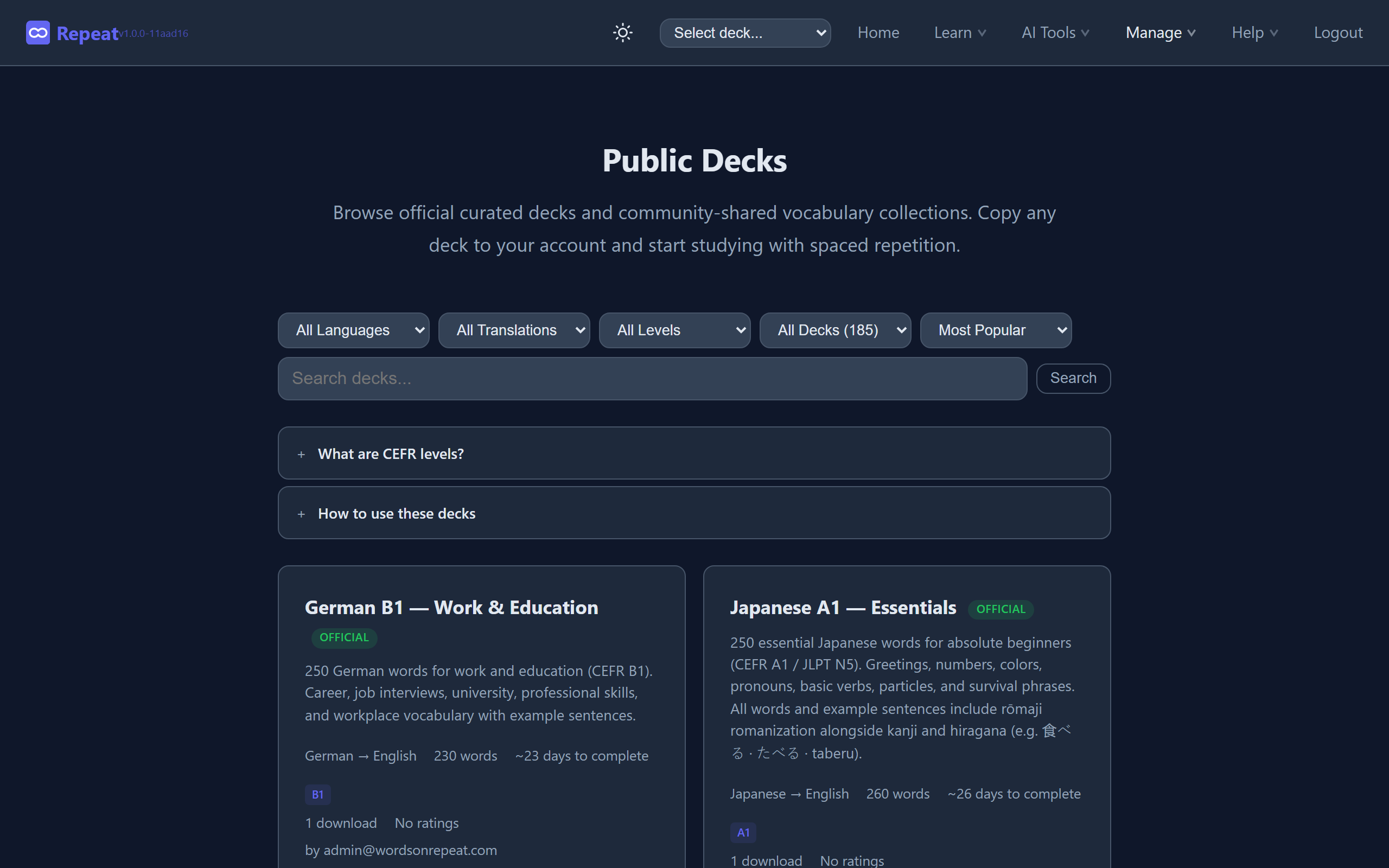
The decks follow a learning path. Start with A1 Essentials (500 most common words), move to A2 once you're comfortable, and progress through B1/B2/C1/C2. Each level builds on the previous one.
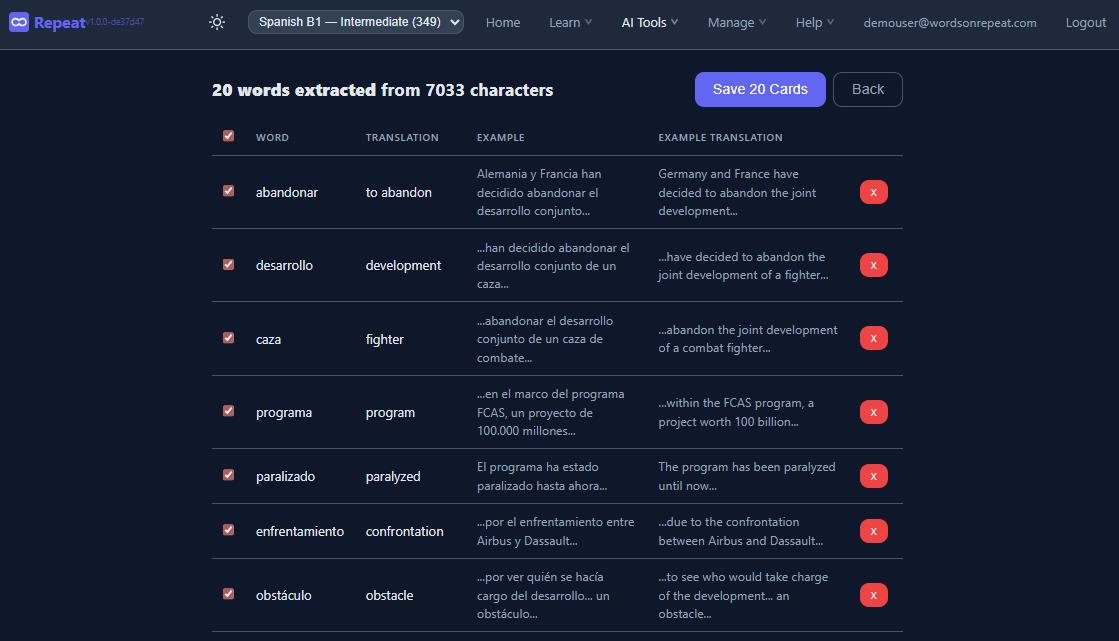
AI word extraction
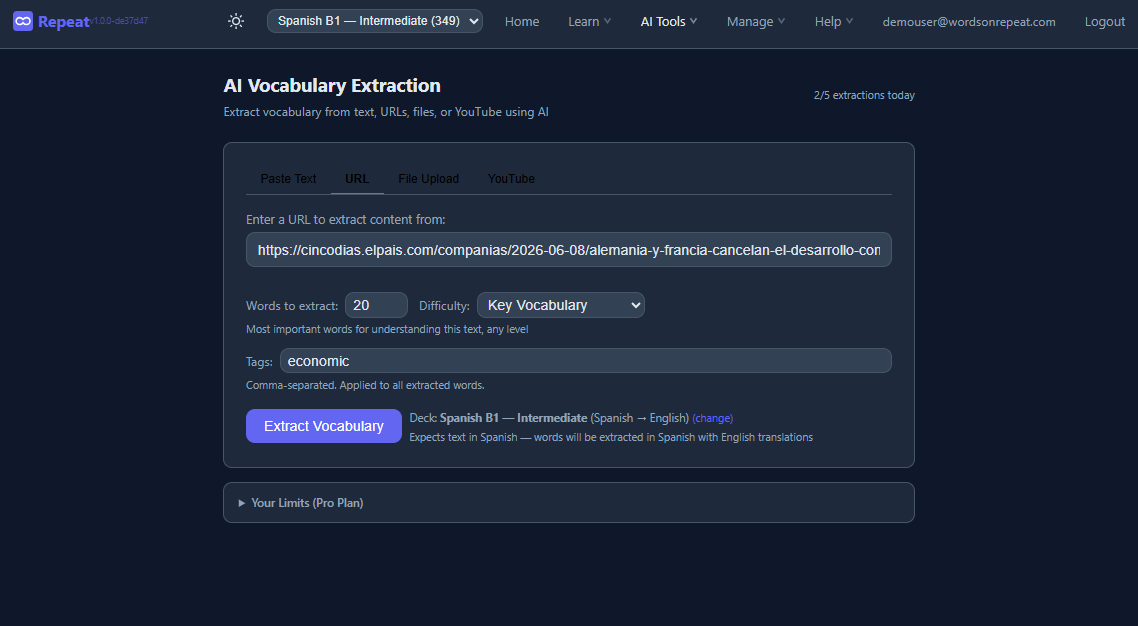
Paste any text - a news article in Spanish, a French podcast transcript, song lyrics, a chapter from a novel - and the AI extracts vocabulary with translations and example sentences. They're instantly added to your deck with context from the original text. Research shows that words learned from content you choose produce stronger memories than words from pre-made lists. See the full AI extraction guide for a walkthrough of all four input methods - URL, text, PDF, and YouTube.
Progress analytics
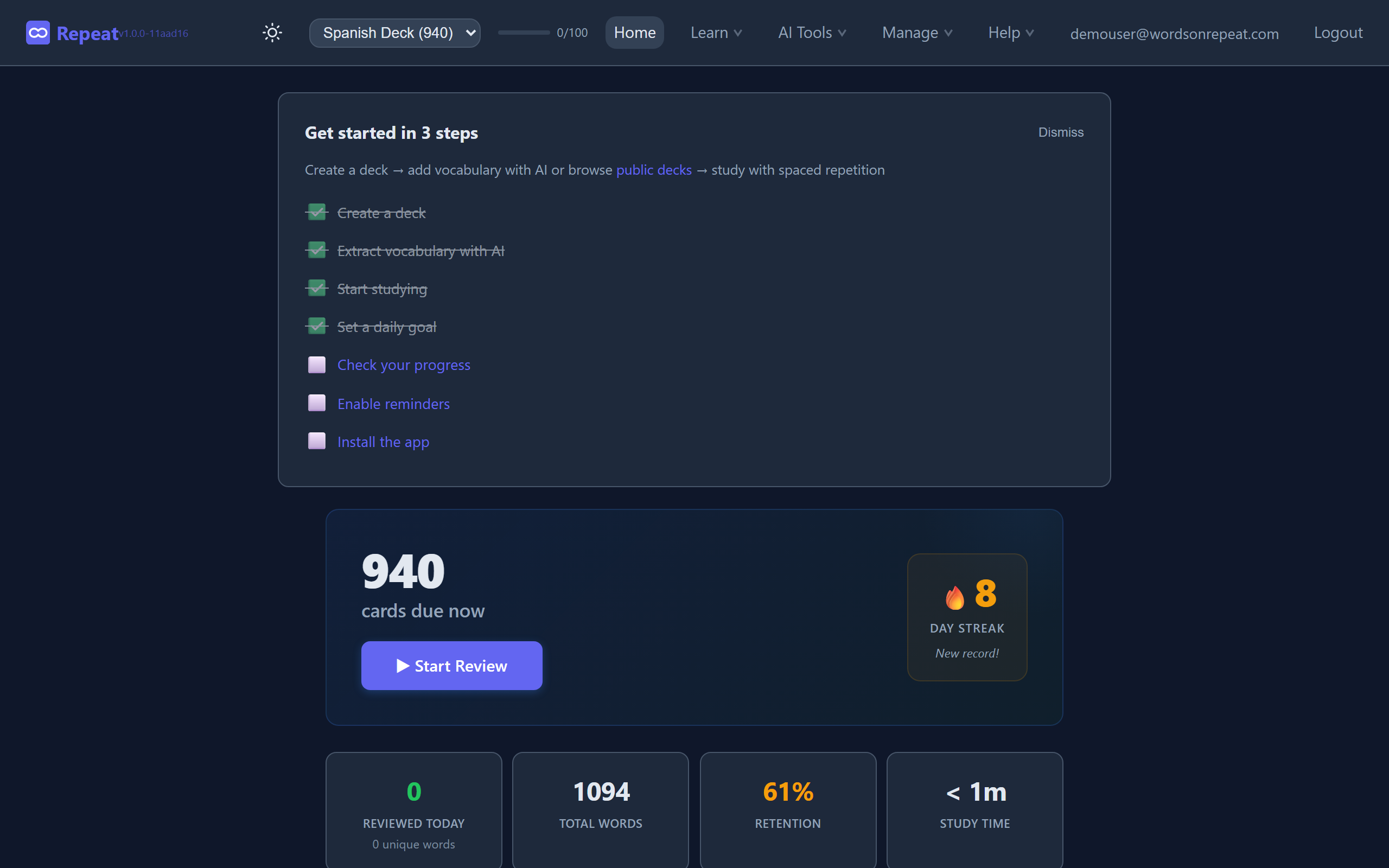
Track your learning at a glance with the dashboard:
- Daily review count and streak
- Retention rate (what percentage of cards you're remembering)
- Cards by state (new, learning, review, relearning)
- A heatmap of your study activity
Honest Comparison Table
For a quick side-by-side, see our full comparison page. Here's the detailed breakdown:
| Feature | Words on Repeat (Free) | Quizlet Free | Quizlet Plus ($36/yr) | Anki (Free) |
|---|---|---|---|---|
| Basic flashcards | Yes | Yes | Yes | Yes |
| Spaced repetition algorithm | FSRS | None | Basic (Leitner-like) | SM-2 or FSRS |
| Learn/study mode | Yes | No | Yes | Yes |
| Quiz modes available | 7 modes built-in | 1 (flip cards) | 6 modes | Via add-ons |
| Offline access | Yes (PWA) | No | Yes | Yes |
| AI word extraction | Yes | No | Limited | No |
| Import from Anki (.apkg) | Yes | No | No | N/A |
| Import from Quizlet | Yes | N/A | N/A | No |
| Import from CSV/text | Yes | Yes | Yes | Yes |
| Custom deck creation | Yes (unlimited) | Yes (limited) | Yes | Yes |
| Progress analytics | Advanced | Basic | Advanced | Basic (or add-ons) |
| Pre-made quality decks | 200+ curated official | Community (variable) | Community | Community |
| Example sentences on cards | Every card | Depends on creator | Depends on creator | Depends on creator |
| Grammar notes per card | Every card - conjugations, gender, usage tips | No | No | Depends on creator |
| Mobile experience | PWA (free, no ads) | Native app (with ads) | Native app | Native app (iOS $25) |
| Open source algorithm | Yes (FSRS) | No | No | Yes |
| Price | $0 | $0 | $35.99/yr | $0 (iOS: $25) |
Where each platform genuinely wins
We want to be honest about trade-offs:
Quizlet is still best if you need:
- Classroom features (Quizlet Live, teacher dashboard, class sets)
- Diagram/image-heavy study sets (anatomy, geography)
Anki may work if you need:
- Total customization of card templates (HTML/CSS/JS) and don't mind extensive setup
- Granular control over every algorithm parameter (most users never touch these settings)
Words on Repeat is best if you need:
- Real spaced repetition (FSRS) without any configuration
- 7 free quiz modes that Quizlet charges $36/year for
- Curated decks with grammar notes and example sentences on every card
- A clean, modern interface you can start using in under a minute
- Import from both Quizlet and Anki - bring your existing cards
- No ads, no paywalled study features, no surprises
How to Migrate from Quizlet (Step by Step)
Method 1: Direct text export (easiest)
- Open your Quizlet study set
- Click the three dots (...) → Export
- Set separator to "Tab" between term and definition
- Set rows separated by "New line"
- Click Copy text
- Log into Words on Repeat, create a new deck
- Click Import → select the Quizlet format → switch to the Paste Text tab
- Paste the copied text and click Import
Note: Quizlet may require a paid plan to access the Export feature. If the export option isn't available, consider Method 2 or recreating your cards with the curated decks.
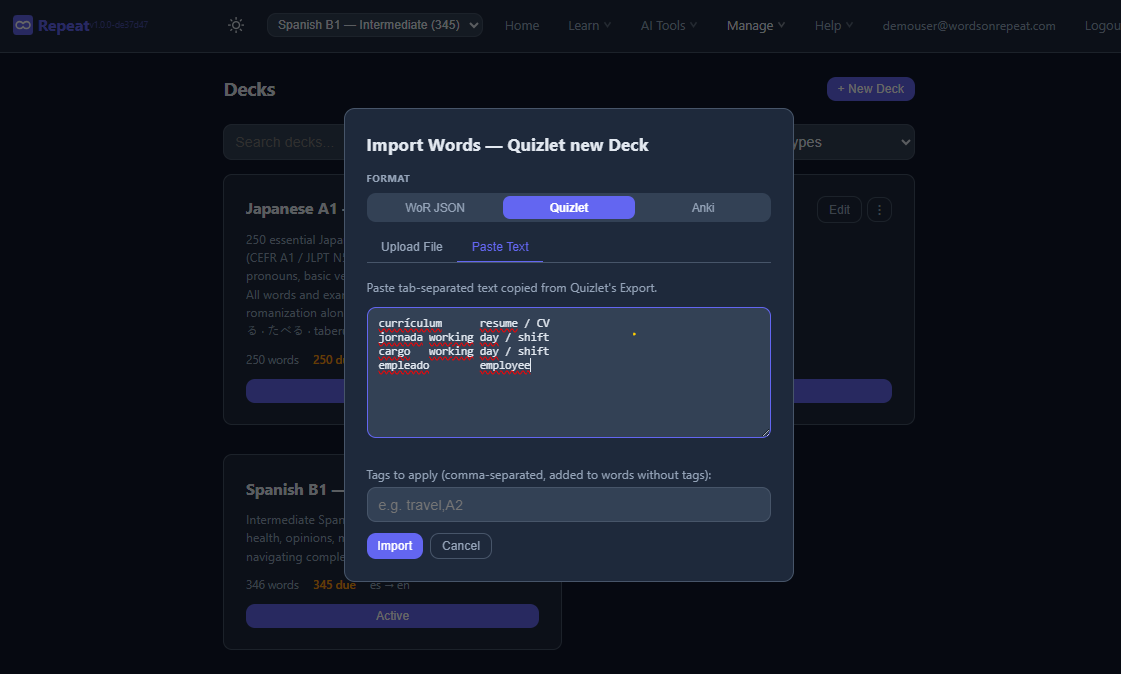
Your cards are immediately available for study with FSRS scheduling.
Method 2: Use curated decks instead
If you were studying a language on Quizlet with community-made sets, you might actually get better content from the curated deck library. Community Quizlet sets often have typos, inconsistent formatting, and no example sentences. The official Words on Repeat decks are reviewed for accuracy, include example sentences with translations, and follow CEFR vocabulary standards.
Method 3: Already using Anki?
If you already have an Anki collection, you can import it directly:
- In Anki, go to File → Export and choose
.apkgformat - In Words on Repeat, click Import → select the Anki format
- Upload your
.apkgfile - text-only cards (word + translation) are imported. Images and custom card templates are not supported
If your set has more than 500 cards, split it into level-based sub-decks (A1 vocabulary in one, B1 in another) for more manageable daily reviews.
Frequently Asked Questions
Is Words on Repeat really free? What's the catch?
The core study experience is genuinely free - all 7 quiz modes, FSRS scheduling, unlimited decks, progress tracking, and 200+ curated decks. There's a Pro tier for power users that adds features like advanced analytics and priority AI processing, but nothing essential is locked behind it.
Can I use it on my phone?
Yes. Words on Repeat is a Progressive Web App (PWA). Open it in your phone's browser, tap "Add to Home Screen," and it works like a native app - including offline. No app store required, no storage space wasted.
How does it compare to Anki specifically?
Same core algorithm (FSRS), but a completely different experience. Anki requires significant setup - finding the right settings, installing add-ons for basic features like dark mode, and configuring card templates. Words on Repeat gives you everything ready to use in under a minute: 7 quiz modes, grammar notes, curated decks, and FSRS scheduling - no configuration, no add-ons, no tutorials needed.
What about Memrise / Duolingo / Babbel?
Those are structured course platforms - they teach you in a fixed sequence with gamification. Words on Repeat is more flexible: you choose what to study, and the FSRS algorithm optimizes when you review it. With curated CEFR-leveled decks, grammar notes on every card, and 7 quiz modes, Words on Repeat covers both vocabulary and grammar context - reducing the need for supplementary apps.
I have 800+ cards on Quizlet. Will import be smooth?
Yes. The text import handles large sets without issues. The free plan supports up to 1,000 words total across all decks - plenty for most learners. If you need more, Pro removes all word and deck limits. For large sets, consider splitting into level-based sub-decks (A1, B1, etc.) for more manageable daily reviews.
The Bottom Line
The flashcard landscape in 2026 looks different than it did five years ago. Quizlet chose to prioritize revenue over its free user base. That created an opening for tools built on better principles.
If you're a language learner who wants:
- Spaced repetition that actually works (FSRS, not random shuffling)
- Multiple study modes without paying $36/year
- Pre-made decks organized by your actual proficiency level
- A clean interface that just works
Then Words on Repeat is worth trying. Import your existing cards or start with a curated deck - either way, you'll be studying in under a minute.